Cockatoo Myriota (Satellite) - Pulse Counter

Table of Contents
- 1 Table of Contents
- 2 Overview
- 3 Released Variants
- 4 Satellite Communications
- 5 Cockatoo
- 6 Site Selection and Installation
- 7 Messages and Readings
- 8 Service Level Agreement for Data Carriage < pending>
- 9 Readings
- 10 Data Delivery
- 10.1 Delivery bundles
- 10.2 Aqualus Water
- 10.3 Data Feeds - MQTT /CSV
- 11 Taggle Operations Management
- 12 Frequency Asked Questions
Overview
The Cockatoo is a flexible telemetry solution which is highly configurable in terms of radio, sensor interface and power source configurations.
This release is for the satellite radio Cockatoo using the Myriota satellite solution, and supports;
Pulse Counter
What is Myriota Satellite?
Types of Radios
The Myriota radio has two radio variants, but initially Taggle is releasing the Australian variant (S1)
Service 1 – VHF/UHF - ( Australian certified radio).
VHF TX - 160-161Mhz
UHF RX - 400 - 401Mhz
[not yet released]
Service 2 – UHF/UHF - (Selected overseas countries) [not yet released]
UHF TX – 399 - 400Mhz
UHF RX – 400 - 401Mhz
How can you determine the Service 1 or Service 2 of a stock or deployed product ?
The product has S1=Service 1 or S2=Service 2, shown in the second field of the product as per “CK2-S1-I-2B-0-0-PCA-AU” which is a Service 1 device.
In Taggle Tools the radio is called Skylark-S1 or Skylark-S2
Cockatoo Functional description
Radio - Myriota satellite ( internally Taggle Tools the radio is called Skylark-S1 or Skylark-S2)
Sampling and Transmission - hourly sampling, transmission once every 6 hours ( 4 per day)
Battery - 2 x D-cell or 4xD-cells
Antenna - internal antenna only
NFC - NFC enabled for commission and device status determination
Environmental protection - IP68 rated.
Bracket - Stainless Steel bracket with hose clamp restraint.
Tamper Sealing - through bolts in underside of Cockatoo or through worm drive of hose clamp
Protection Cap (recommend accessory) - for locations at risk of vandalism or possible animal damage, the protection cap conceals the plugs and cables.
Key Note this is seperate part but should be INCLUDED in all Myriota deployments to protect the plug from the environment and animals.
Released Variants
The table below lists the main Stock Keeping Unit (SKU) in green, with the attached document below the table representing the complete list with non-stocked but released SKU variants.
| Power | Antenna | Product Code | Product Description | Warranty | Expected Life | |||
Variant | 2B | 4B | Ext. | Int. | Ext. |
|
|
|
|
Pulse Counter (main SKU) | Y |
|
| Y |
| CK2-S1-I-2B-0-0-PCA-AU | Cockatoo - Myriota S1 radio with internal antenna, 2 x battery for pulse counting sensor - Aust. version | 2 years | 10+ years |
Pulse Counter |
| Y |
| Y |
| CK2-S1-I-4B-0-0-PCA-AU | Cockatoo - Myriota S1 radio with internal antenna, 4 x battery for pulse counting sensor - Aust. version | 2 years | 10+ years |
Protection Cap |
|
|
|
|
| CK2 - Cap | Cockatoo protection cap |
|
|
|
|
|
|
|
|
|
|
|
|
Communications Plan |
|
|
|
|
| COM-S1-PCA-6S4T-ANN | Communications plan for Myriota Satellite using pulse counting sensor set for 60min reading samples and four transmissions per day - Annual fee per device |
|
|
User guide
Refer to Master Cockatoo Product Page for latest User Guide
https://taggle.jira.com/wiki/spaces/PROD/pages/6841598016
Slide deck materials for Sales and Training teams
What's in the Box
Cockatoo Myriota Pulse Counter;
Pulse counting firmware - netflow
Internal satellite Antenna
2 or 4 batteries depending on variant
Stainless steel Cockatoo mounting bracket
Stainless steel hose clamp (to mount Cockatoo to bracket)
Cockatoo Sensor Plug for Field Wiring
Quick Reference Guide
Optional Accessories (recommended)
Cockatoo Protection Cap
Not include
25mm Conduit adapter
25mm conduit
Mounting post
Example Deployments
Satellite Communications
How it work ?
The Cockatoo needs good line of site to the satellite ( as it passes overhead). Refer to installation documentation in the sections below and User Manual found here for specific information. The Myriota satellite is a Low Earth Orbit (LEO) satellite which means it is constantly moving, and a Cockatoo is hence communicating to a different satellite during each communication event.
Communication Windows
The Cockatoo will sample the sensor at its allotted time interval, and once very 6 hours create a message which is sent to the satellite radio module in the Cockatoo. The satellite radio module will then WAIT, until a satellite is overhead before it will transmit the message. This can a further delay of up to 6 to 12 hours, depending on the current orbit of the satellite.
Each sample is a taken on a rolling 1 hour interval since the device was first activated. For example an activation at 1:14pm, will mean all future sample readings will be taken at 14 minutes past the hour , 2:14pm, 3:14pm, 4:14pm and so on.
No fixed transmission time slot
The Myriota satellite constellation is made up a many satellites whose orbits around the earth change over time, which is a function of many variables. We, as Taggle do not need to worry about this point, as the satellites downlink a broadcast message to ensure the Cockatoo is kept up to date with the latest satellite Constellation map. The latest Constellation map is broadcast to all Cockatoos on a semi regular basis, and managed by Myriota. More details in latest section.
Note to Taggle Operations - The satellite radio module in the Cockatoo is essentially self managed, so Taggle Operations do not need to worry about issuing updates. The later section below, does show how Taggle can determine when any specific Cockatoo received the latest update, refer to Myriota Device Management Platform below.
Myriota Satellite
Cockatoo
The images below show the internals of the Cockatoo with the -
GPS antenna
Satellite Antenna
Myriota Radio Module
Site Selection and Installation
The installation of a Cockatoo Myriota is extremely important, as the Cockatoo needs good line of sight to a satellite as it passes over head.
Poor installations will SIGNIFICANTLY impair transmission reliability. This will manifest with missed transmissions and data gaps in the data feed/ Aqualus Water.
Customers are strongly advised to elevate the Cockatoo to get good clear line of sight to the surrounding sky as to per SITE information below. The data delivery will be impaired if the site is obstructed (in any direction), and may lead of missed intraday messages. For example 1 or 2, or in an extreme case several messages may not get through.
Redundancy is built into the operating behaviour of the Cockatoo. The Cockatoo will attempt to resend messages to different later satellites as they pass, but owing to the angle to the horizon, this can vary based on site and surrounding built up area, foliage or obstacles.
Cockatoo Mounting and Elevation
The Cockatoo should be deployed with a full and unobstructed view of the sky in all directions 360 degrees to maximise transmission success on every satellite pass.
Physical obstacles including trees, buildings, and poles will block signals and may degrade system performance.
The diagrams below are designed to show how the sky view of a Cockatoo can be reduced by proximity to adjacent obstructions but improved with vertical elevation of the Cockatoo.
Ideally the Cockatoo should have a full sky view that includes visibility of the horizons at elevations above 10 degrees.
Examples are good installs are below, note the Cockatoo is
elevated 1.5m from the ground
away from large obstacles and trees.
The Cockatoo bracket is not below the top of the post
- example 30mm x 30mm postRadome Antenna is above top of bracket
Cockatoo Myriota’s should be spaced no less than 5 metres from each other.
The following diagrams show examples of more desirable deployments for a satellite-enabled Cockatoo.
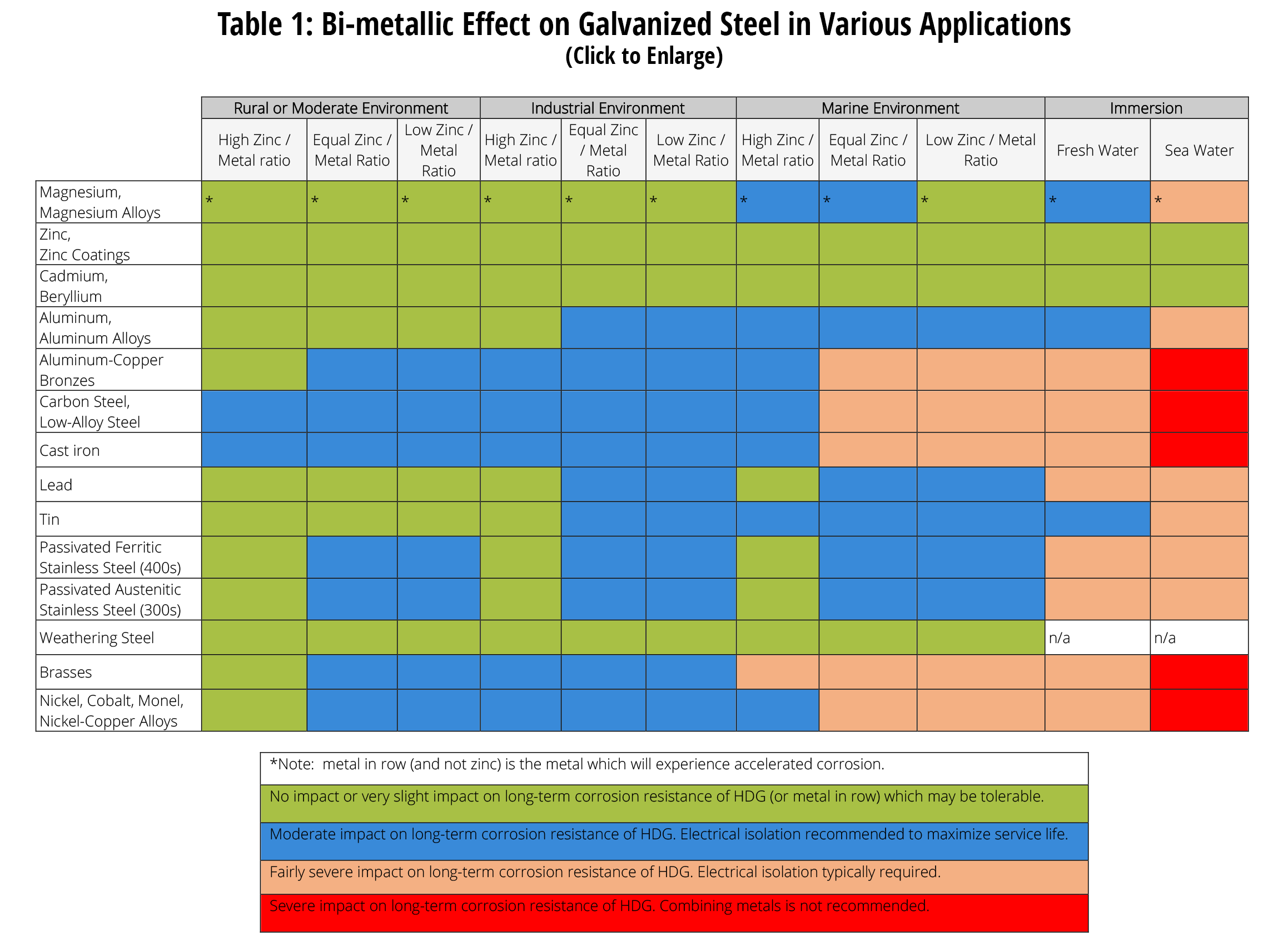
Metal on metal corrosion
When mounting a metal post or clamp to another metal, such as a water pipe you need to ensure the metals are the same material or insulated from each other to minimise metal corrosion.
The implication here is Taggle and our installers need to ensure our installation is not going to contribute to water pipe degradation from the two metals interacting and leading to corrosion of the water pipe.
Good Install sites
Examples of reliable installations based on current experience (sites are from S.A. Dept of Environment and Water (DEW)
Attached to Building - site 1
Attached to Building - site 2
Open Area
Valley installation
Remote Site
Case study of challenging site
Site : edge of golf course in a pump controller cabinet.
Trees are obstructing a percentage of the radio transmissions, hence difficult to Taggle to guarantee an SLA when local site dependencies, such as a mounting on the cabinet constrain the deployment.
Transmission Performance over 20 weeks from golf course
Source file :
Satellite Passes
The following section is an attempt at outline how Cockatoo functions in terms of message transmissions. Each message is sent several times and possibly to different satellites, in an attempt to maximise the transmission success of the one way ( not acknowledged ) message transmission.
The images below are included in the file below.
How its works
Messages are queued up in the Cockatoo, which waits until it expected a satellite and then broadcasts the message. The message may be held for some time ( many hours) before being sent.
Note the same message may be sent several times to differing satellites as they pass overhead, to try and elevate the percentage of success of the message’s delivery, as the transmission is one way and NOT acknowledged by the satellite. ( in case you are wondering the constellation downlink message is a general broadcast message, and so not a “true” two communication method.
Satellite orbit is important
Satellite pass overhead at differing angles and paths, we call this Constellation Data. The Cockatoo is using the Constellation data determines when to send the messages.
Satellite do not pass overhead, and may be low on the horizon
Clear sight of the Sky is very important.
A single site is served by many satellites and the same satellite from different angles
Built up areas/foliage can impair transmissions
Constellation Data
Constellation Data ( the orbits of the satellites) degrades over time, and needs to be updated. The implication her is when Taggle produce Cockatoo devices which may sit in the warehouse ..
During the initial phase after start-up, the Myriota Module needs to learn information about the Myriota Network. To speed up the learning process, the Module wakes up more frequently to receive from the satellite constellation. For devices with clear skyview and good receive performance the learning phase will typically last several days. If the receive performance is poor, the learning phase can last on the order of weeks, resulting in increased energy consumption. It is important for your device to have good receive performance in order to maximise battery life
After Activation , Cockatoo will look for updated Constellation data
Day 1- every 6 hours
Day 2- every 12 hours
Day 3 - every 24 hours
from Day 4 - Weekly
Device Security
Electronic Security
The Cockatoo Myriota device was AES-256 for communication from the Cockatoo to the Satellite and then down to the ground station.
There is NO Tamper alert on the Myriota Cockatoo.
Physical Security
Owing to the Cockatoo being typically in a remote location, it is advisable to use the Protection Cap and conduit to protect the sensor cabling. Further tamper seals are also recommended as shown in attached slide deck.
Cockatoo Activation
Quick Start Guide
The activation steps are clearly listed in the Quick Start Guide.
NFC Interrogation
After connecting a properly wired sensor, note the two key variables to validate readiness to transmit
ACTIVATED ( rather than FLIGHT Mode)
GPS LOCK =1 ( rather than 0)
Messages and Readings
All Cockatoo Myriota devices are set to sample readings once per hour, and then build a message with 6x readings, which is this queued for transmission ( at the next satellite pass.) The result is essentially 4x messages per day, providing 24 seperate hourly readings.
Unlike Byron where the sample readings and transmissions occur essentially immediately, Myriota has inherit delays which means a message may be delayed up to 12 to 24 hours depending on the situation. The delay is due to -
Main delay
Messages are queued in the Cockatoo until the next satellite pass
Messages are cached in the satellite, until the satellite overflies the ground station
Myriota explanation - https://support.myriota.com/hc/en-us/articles/6983443599759-Myriota-Network-Latency
Minor delay
Myriota data processing (minor delay)
Taggle IOT retrieving the messages from Myriota ( via API) (minor delay)
Service Level Agreement for Data Carriage < pending>
Myriota unlike Byron is a satellite communications with a far greater number of variables which can affect the consistent successful message delivery to Taggle.
The proposition of satellite IOT communications ( Myriota) is NOT 100% data delivery and customer installation of the Cockatoo and the surrounding environment near the Cockatoo ( trees, buildings etc) which affect the “direct line of sight to the satellite” will negatively impact communications.
Below is the a confidential copy of our contracted SLA for the network services. Taggle has interpreted these SLA’s , into our development of the Network-as-a-Service Agreement (NaaS) with our end customers.
Key points to note
No end customer service credits on data delivery.
More than likely 70% expected minimum data delivery.
Readings
Readings are NOT midnight aligned, and like Byron are taken hourly after the device was activated. If the device was activate at 1:10pm, all future samples will be taken at 10 minutes past the hour.
In such an example the readings for the first message would be 1:10pm, 2:10pm, 3:10pm, 4:10pm, 5:10pm, 6:10pm and 7:10pm after which time the message will be created and queued up for transmission.
Missed Satellite Pass
Missed passes will occur for various reasons -
Low on the horizon satellite pass, and an obstacle (ie tree or building) in the line of sight
Temporary local obstacle
Missed Readings Frequency
Total Monthly Message receipt as % Data Continuity
Examining message delivery over time, has a major influence on the % data continuity. One message missed over -
1 day is 75% data continuity (1 in 4 messages)
7 days is 96.5% data continuity ( 1 in 28 messages)
30 days is 99.2% data continuity (1 in 120 messages)
% Data Continuity | Received Messages per month | Missed Messages per month |
| Equivalent messages per day | Equivalent missed days during month |
100% | 120 | 0 |
| 4 messages | 0 |
95% | 114 | 6 |
|
| 1.5 |
90% | 108 | 12 |
|
| 3 |
85% | 102 | 18 |
|
| 4.5 |
80% | 96 | 24 |
|
| 6 |
75% | 90 | 30 |
| 3 messages | 7.5 |
70% | 84 | 36 |
|
| 9 |
65% | 78 | 42 |
|
| 10.5 |
60% | 72 | 48 |
|
| 12 |
55% | 66 | 54 |
|
| 13.5 |
50% | 60 | 60 |
| 2 messages | 15 |
Aqualus Water Property Dashboard
Leak Detection
Leak detection will operate as per normal in Aqualus Water.